Best ERP Software for Manufacturing Startups: Complete 2026 Guide
Most manufacturing startups begin the same way. A small team, a rented shop floor, and an Excel sheet that somehow tracks everything — raw material stock, purchase orders, customer follow-ups, all of it in one file with a dozen tabs.
It works fine for the first few months.
Then orders start coming in faster than the sheet can keep up. Someone forgets to update the stock count. A batch of raw material runs out halfway through a production run. An order ships three days late because nobody noticed the due date. A customer calls asking why the invoice doesn’t match what actually arrived.
None of this happens because the team is careless. It happens because spreadsheets and manual tracking were never built to run a growing factory. This is exactly why so many small manufacturers are now searching for the best ERP software for manufacturing startups — one system that replaces scattered sheets, WhatsApp updates, and guesswork with a single source of truth.
This guide covers why ERP matters for a young manufacturing business, which features actually matter, and how to pick a system built for a startup budget rather than a large factory budget.
Why Manufacturing Startups Need ERP
A factory running on spreadsheets usually looks fine from the outside. Inside, it’s a different story. Stock counts get updated once a week instead of in real time. Production schedules live in someone’s head, not on paper. Purchase orders get placed twice because two people didn’t check with each other first.
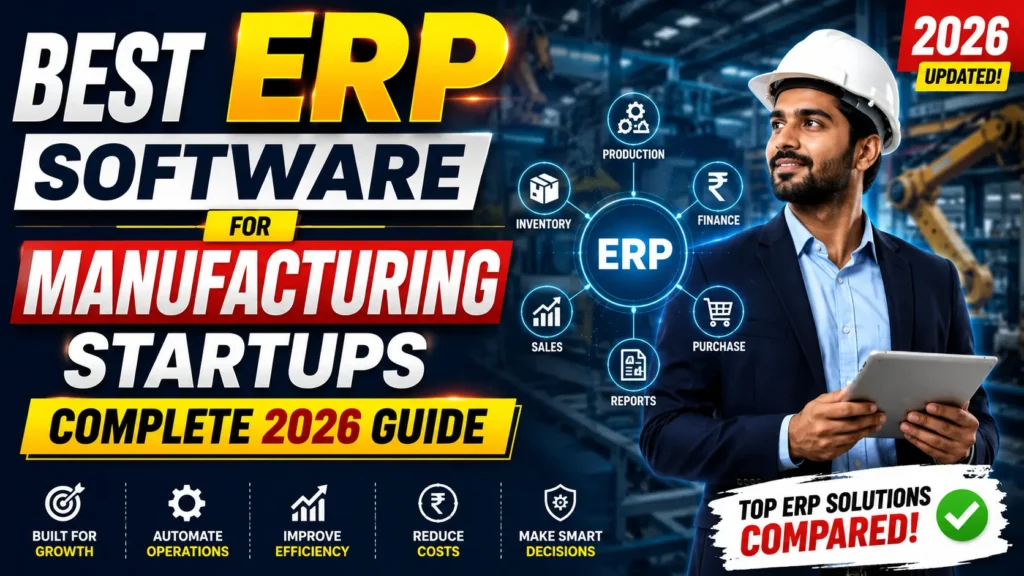
ERP software for manufacturing solves this by connecting every part of the business — inventory, purchase, production, sales, and accounts — into one place. Instead of five people checking five files, everyone works off the same live data.
For a growing business, this isn’t a luxury. It’s what separates a startup that scales smoothly from one that keeps firefighting the same problems every month. This is also why guides like our breakdown of the best ERP for manufacturing in India keep coming up in founder conversations — the pain points are almost identical across industries.
Key Features to Look For
Not every manufacturing ERP software is built the same way, and a startup doesn’t need everything a large factory uses. Here’s what actually matters early on:
- Inventory management — real-time stock levels, so nobody finds out material is short only after production has started
- Production planning — a clear view of what’s scheduled, what’s pending, and what’s delayed
- CRM — one place to track leads, follow-ups, and customer history instead of scattered notes
- Sales management — quotations, orders, and invoices linked together automatically
- Purchase management — vendor tracking, purchase orders, and approvals without endless email chains
- Accounting — expenses, payments, and GST-ready billing in the same system
- Reports — simple dashboards instead of manually building reports every week
- AI dashboard — early warning on delays, stock shortages, or slow-moving orders before they become real problems
The last point matters more than most startups expect. AI ERP software isn’t about replacing people — it’s about flagging issues before they turn into missed deadlines. If you’re curious how far this can go, we’ve written about agentic AI in ERP systems and where manufacturing automation is heading next.
Benefits of ERP Software
Once inventory, production, and sales sit inside one manufacturing management software, the day-to-day changes in ways that show up quickly:
- Stock counts match reality, so production doesn’t stall over missing material
- Production scheduling becomes visible to everyone, not just one supervisor
- Sales and purchase teams work off the same numbers, cutting down on double orders
- Invoices and payments stay accurate, reducing awkward customer conversations
- Owners get a real-time manufacturing dashboard instead of asking three people for updates
- New staff can be trained faster since one system replaces five different habits
There’s also a customer-facing side to this. A startup that reliably ships on time and bills correctly builds trust faster than one that’s still ironing out spreadsheet errors. If your sales team is also juggling scattered customer data, it’s worth reading whether a customized CRM solution makes sense alongside your ERP rollout.
How to Choose the Right ERP
Picking ERP software for startups is different from picking one for an established factory with 200 workers. Here’s what actually helps at this stage:
Start with your actual problems. If inventory tracking is your biggest pain, prioritize that module first instead of buying an all-in-one system you’ll only use 30% of.
Prefer cloud ERP over on-premise setups. A cloud ERP means no server maintenance, access from your phone on the shop floor, and lower upfront cost — all useful when cash flow is tight.
Check how customizable it is. A generic ERP built for retail won’t understand shop floor management or production batching. Look for something built with manufacturing workflows in mind.
Ask about support. A missed production day because nobody could reach support is a real cost. Confirm response times before signing anything.
Try before you commit. A short trial or live walkthrough tells you more in twenty minutes than a sales brochure ever will.
If you want to compare notes on pricing and setup across vendors, our blog has detailed breakdowns for different business sizes and budgets.
Why DP Vision Analytics is a Smart Choice
DP Vision Analytics builds ERP and CRM systems specifically for manufacturing startups and MSMEs, rather than adapting a generic system after the fact.
The factory management software here covers inventory, purchase, production scheduling, and sales in one dashboard, with AI powered ERP features that flag stock shortages and delays before they disrupt a production run. Everything runs on cloud ERP, so owners can check the shop floor from a phone while sitting in a client meeting.
What tends to matter most to first-time ERP buyers is customization and support — a system that’s shaped around how their factory actually works, and a team that answers when something breaks. That’s the approach here: modules are built around the customer’s actual process, not the other way around.
You can see how this has come together over time on our media coverage page, or read more about the team behind it on our about us page.
Final Thoughts
Digital transformation doesn’t have to mean a six-month rollout and a six-figure invoice. For most manufacturing startups, it starts with replacing one spreadsheet at a time — inventory first, then production, then sales — until the whole factory runs on one connected system instead of five disconnected habits.
If Excel errors, missed deliveries, or stock mismatches sound familiar, it’s worth seeing what a proper manufacturing startup software setup actually looks like in practice.
Book a free demo and walk through your specific shop floor challenges: Book Free Demo
Or get in touch directly: Contact DP Vision Analytics
Prefer a quick chat? Message us on WhatsApp
The best fit depends on your factory size and budget, but look for cloud ERP with strong inventory, production, and sales modules. A system built for manufacturing workflows — not a generic retail tool — will save far more time than a cheaper, one-size-fits-all option.
Costs vary widely based on modules and number of users. Cloud ERP for startups is usually priced per month rather than a large one-time fee, which keeps it manageable for a business still managing tight cash flow.
Yes. Reputable cloud ERP providers use encrypted storage and regular backups, which is often more secure than a laptop spreadsheet with no backup at all.
A small manufacturing setup can often go live in a few weeks, especially with cloud ERP, since there’s no server setup involved. Larger customizations naturally take longer.
Yes, that’s actually the point of a proper manufacturing ERP. Inventory and production scheduling are meant to work off the same live data, so a shortage on the floor shows up in the system immediately instead of being discovered mid-run.