How to Choose a CRM Software for Your Startup
Why This Decision Matters More Than You Think
Here’s a situation most startup founders recognize instantly.
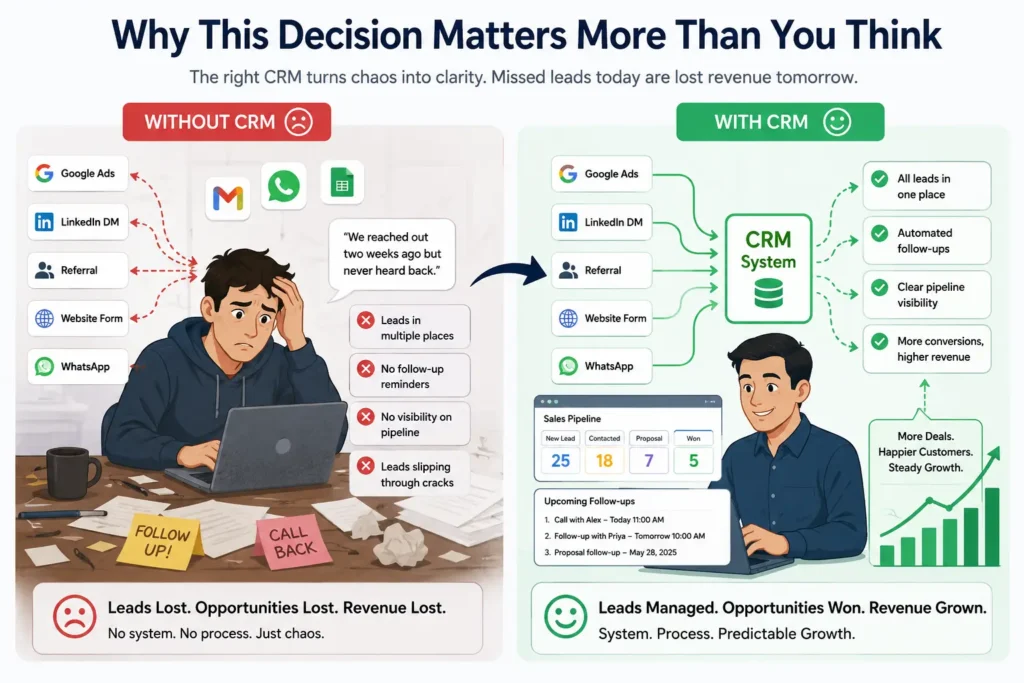
You’re three months post-launch. Leads are coming in from five different directions — a Google ad here, a LinkedIn DM there, a referral from a happy customer, someone who filled out your contact form at 11 PM. Your team is handling follow-ups over WhatsApp, Gmail, and a shared spreadsheet that everyone interprets slightly differently.
Then a prospect emails: “We reached out two weeks ago but never heard back.”
You search your inbox. Nothing. Your co-founder checks the sheet. Also nothing. Somewhere in the chaos of early growth, a warm lead — possibly a significant deal — simply vanished.
This is the exact problem CRM software solves. Not glamorously, but ruthlessly effectively.
Sales research consistently shows that response time is one of the strongest predictors of lead conversion. Companies that respond to leads within the first few minutes convert dramatically better than those that follow up hours or days later. Without a CRM triggering that follow-up automatically, most startups just don’t respond in time — not because they don’t care, but because there’s no system enforcing it.
Choosing the right CRM changes that dynamic. It also improves customer retention: businesses that use CRM tools to systematically manage relationships typically see higher repeat purchase rates and lower churn than those relying on ad-hoc communication.
Choosing the wrong CRM — or delaying the decision until chaos forces your hand — keeps you firefighting when you should be scaling.
What is CRM Software, Really?
CRM stands for Customer Relationship Management. Strip away the industry jargon and it’s this: a single place where your entire relationship with every prospect and customer lives.
Every email sent. Every call logged. Every deal stage update. Every note from a client conversation. Every support ticket. All of it connected to one contact record, accessible to your whole team.
A good CRM management system gives your startup three things a spreadsheet never can:
Visibility — Anyone on your team can open a contact record and instantly understand the full relationship history, without asking anyone.
Automation — Repetitive tasks — follow-up reminders, welcome sequences, lead assignment, stage-based notifications — happen without human intervention.
Intelligence — Your data starts revealing patterns: which lead sources convert best, where deals stall in your pipeline, which customers are at risk of churning before they actually do.
For startups, this matters because your team is small and your margin for dropped balls is essentially zero. A CRM doesn’t just organize data — it enforces process at a stage when your team is too busy to maintain process manually. book your Demo of your Custom CRM
Signs Your Startup Actually Needs a CRM Right Now
You don’t need to wait until you’re overwhelmed to act. These are the real signals:
- You have more than 30 active leads and tracking them in a spreadsheet feels fragile
- Two people on your team followed up with the same prospect on the same day — or neither did
- You genuinely don’t know your lead-to-customer conversion rate
- Customer onboarding depends on someone’s memory, not a defined repeatable process
- A sales rep leaving the company would mean losing all context on their active deals
- You’ve started saying “I think we followed up” instead of “I know we followed up”
If three or more of those resonate, you need a CRM — not next quarter, today. BOOK DEMO
Key Features to Look For in a Startup CRM
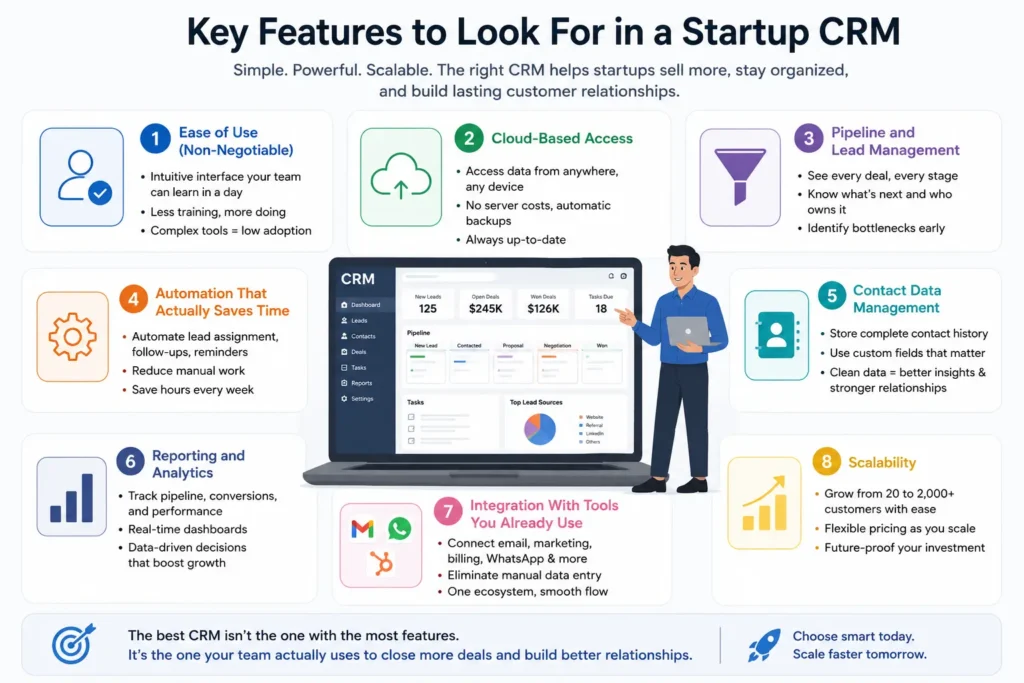
Not all CRM tools are built for early-stage companies. Here’s what separates genuinely useful from over-engineered:
Ease of Use
A CRM your team finds confusing is a CRM your team won’t use. Before evaluating features, evaluate the interface. Can a new sales hire navigate it on day one without formal training?
Salesforce, for example, is extraordinarily powerful. It’s also notoriously complex to configure and maintain. For a five-person startup without a dedicated CRM admin, that complexity becomes a liability that consumes time rather than saving it.
Cloud-Based Access
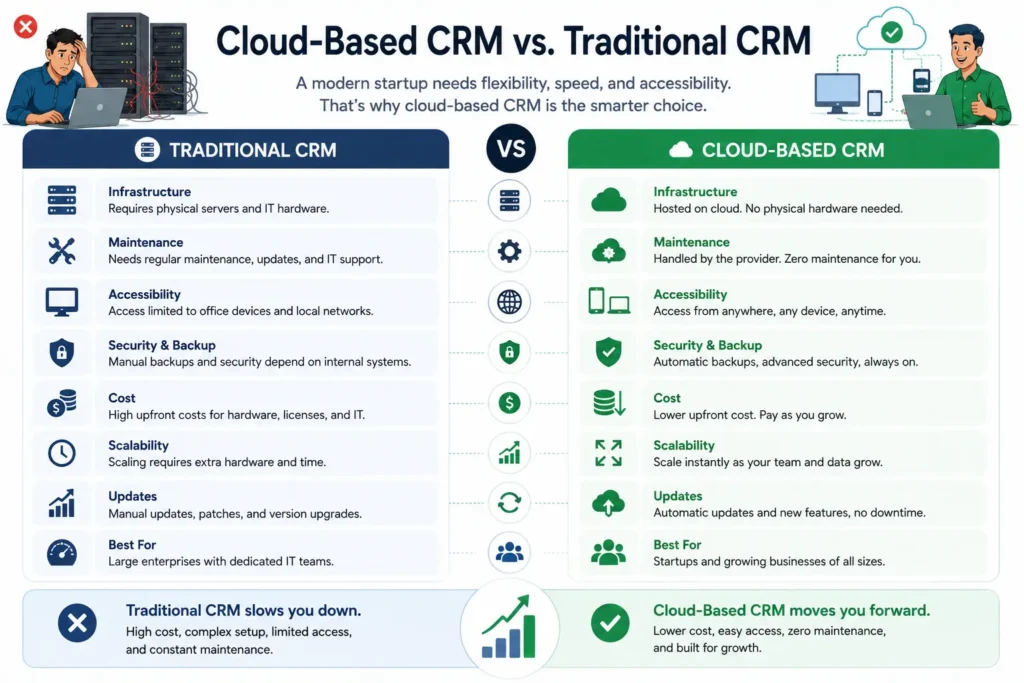
Any serious CRM in 2025 is cloud-based. This means your team accesses live customer data from any device, anywhere — at a client site, while traveling, or from a remote office. Cloud CRM platforms also eliminate server maintenance costs, handle backups automatically, and push updates without any action on your part.
Pipeline and Lead Management
This is the engine of the system. You need clear visibility into where every deal stands — what stage it’s in, how long it’s been sitting there, what the next action is, and who owns it.
A good pipeline view also highlights where deals consistently stall. That’s often more valuable than knowing where they close, because it tells you exactly where to intervene.
Automation That Actually Saves Time
Start by identifying your three most repetitive tasks. For most startups, they’re: assigning new leads to the right team member, sending follow-up emails after no response, and reminding reps about pending actions.
A CRM with strong automation handles all three without anyone touching it. Over a month, this compounds significantly. A team of four can recover meaningful hours each week that were previously spent on manual coordination — time that goes directly back into actual selling and customer relationship building.
Contact Data Management
Rich contact profiles mean your team always knows who they’re talking to. Beyond basics like name, email, and company, you want custom fields relevant to your business — industry segment, deal size, product interest, referral source. Clean, structured data is what makes reporting, segmentation, and lead nurturing actually functional.
Reporting and Analytics
You can’t improve what you can’t measure. At minimum, look for dashboards showing total pipeline value by stage, lead source performance, conversion rates across the funnel, and individual rep activity. This data tells you where to invest more and where to stop spending energy.
Integration With Tools You Already Use
Your CRM exists within a broader ecosystem. It needs to connect cleanly with your email platform, marketing tools, billing system, and — especially relevant for the Indian market — WhatsApp. Missing integrations force manual data entry, which introduces errors and erodes the value of the system over time.
Integration With Tools You Already Use
Your CRM exists within a broader ecosystem. It needs to connect cleanly with your email platform, marketing tools, billing system, and — especially relevant for the Indian market — WhatsApp. Missing integrations force manual data entry, which introduces errors and erodes the value of the system over time.
Common Mistakes Startups Make When Choosing a CRM
These patterns come up repeatedly with early-stage companies:
Buying enterprise software before you need it. Enterprise CRM platforms are designed for organizations with dedicated admins, IT teams, and structured change management. Buying them at the seed stage usually means paying for capability you won’t use for two years, while fighting configuration complexity you didn’t budget for.
Evaluating the demo, not the daily reality. Every CRM looks polished in a 30-minute demo with prepared data. The real question: what does it look like six weeks in, with messy real data and inconsistent adoption? Always request a trial period and test with your actual leads before committing.
Ignoring the true cost of switching later. Many startups choose a quick, cheap tool, outgrow it in 18 months, and then face a painful migration — data exports, re-training, rebuilding automations from scratch. Choosing a slightly more capable tool from the start, even at a marginally higher cost, is almost always worth it.
Not defining their process before implementation. A CRM mirrors your workflow. If your workflow isn’t defined before implementation, the CRM becomes a digital version of the same chaos. Spend time mapping your pipeline stages, handoff points, and follow-up rules before you touch any software.
Treating CRM as a sales-only tool. The most effective implementations connect sales, marketing, and customer support data in one system. When your support team can see the full sales history, and your sales team can see ongoing support issues, the entire customer experience improves — and so does retention.
How DP Vision Analytics Approaches CRM for Startups
Most CRM vendors sell you a platform and hand you documentation. That works if your business maps neatly onto a predefined workflow. Most startups don’t.
DP Vision Analytics takes a different approach. Rather than configuring your startup around a generic CRM template, they design and implement systems around how your business actually operates — your specific pipeline stages, team structure, customer communication patterns, and growth trajectory.
In practice, this means:
Custom CRM configuration that reflects your real sales and service workflow. If your process has six pipeline stages instead of the standard four, that gets built correctly. If WhatsApp is your primary customer channel, that gets integrated cleanly.
CRM and ERP integration for startups where customer data needs to connect with inventory, billing, or operations. When a deal closes in your CRM, the downstream fulfilment, invoicing, and inventory updates happen automatically — no manual handoff required.
Business process automation designed around your specific bottlenecks. The automations that matter for a SaaS startup look very different from those that matter for a manufacturing or professional services business.
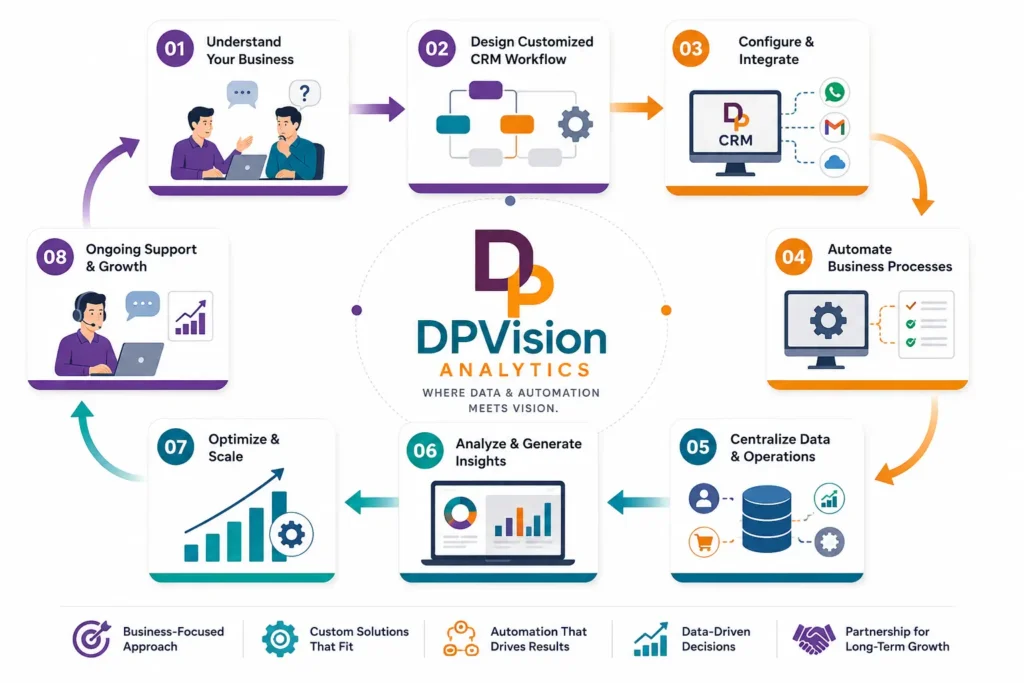
Data architecture that scales. A common problem with early CRM setups is that the data structure doesn’t account for future needs. When you need to segment by region, product line, or acquisition channel two years from now, a properly designed system makes that straightforward. A hastily implemented one makes it a rebuilding project.
Ongoing optimization support. A CRM implementation isn’t a one-time event — it evolves as your business does. Ongoing support ensures your system keeps pace with your growth.
For startups that want a CRM built around their business, not the other way around: dpvisionanalytics.tech
Best Practices Before You Commit
Run through this checklist before signing anything:
- Document your current sales process — stages, handoffs, follow-up intervals, who makes what decisions
- List every tool you use and verify integration availability before committing to any CRM
- Test with real data — import actual leads during any trial, not sample data
- Involve end users — the sales rep who will use this daily should have more input than the founder who checks dashboards monthly
- Confirm data portability — verify you can export everything cleanly if you ever need to switch platforms
- Evaluate support quality before buying — send a pre-sales question and judge their response time and quality
- Model the cost 24 months out — check pricing at 2x and 5x your current team and contact volume
- Start narrow — configure the core workflow first, add advanced features only after your team has adopted the basics
Frequently Asked Questions
It depends on your team size and workflow. Popular options include Zoho CRM (strong India pricing), Freshsales (Indian company, good local support), HubSpot (generous free tier), and Pipedrive (clean pipeline focus). For startups with specific workflows, a customized implementation often beats any off-the-shelf platform.
Spreadsheets and email threads break down fast as lead volume grows. A CRM enforces consistent follow-up, automates repetitive tasks, centralizes customer data, and gives founders clear visibility into pipeline health — all without adding headcount.
Must-haves: contact management, visual sales pipeline, email integration, task automation, and basic reporting. As you grow, add WhatsApp/SMS integration, advanced workflows, customer support connectivity, and ERP integration.
Yes — almost always. No server costs, remote access from any device, automatic updates, and easy scaling. Unless your industry has strict data residency requirements, there’s no practical reason to choose on-premise at the startup stage.
CRM handles the customer-facing side — leads, sales, and service. ERP handles internal operations — finance, inventory, and procurement. They’re complementary: integrating both means a closed deal in your CRM automatically triggers invoicing and fulfilment in your ERP.
Earlier than most founders think. A good trigger: more than 20–30 active leads, more than one person involved in sales, or when you genuinely don’t know your conversion rate. Implementing early is cheap. Implementing under chaos — with bad data habits already baked in — is expensive.
Conclusion
Choosing CRM software for your startup is one of the highest-leverage operational decisions you’ll make in your first two years. Get it right and you build a foundation that compounds — better data, faster follow-ups, smarter automation, and a customer experience that scales alongside your growth. Get it wrong and you waste months, erode your team’s trust in systems, and eventually start over.
The honest advice: don’t let perfect be the enemy of good. Start with a CRM that fits your current process, get your team using it consistently, and improve from there. A simple CRM with strong adoption will always outperform a sophisticated platform that sits half-configured.
But if your startup has specific workflows, integration requirements, or growth ambitions that off-the-shelf platforms don’t accommodate well — don’t force the fit. A CRM designed around how your business actually works is an investment, not an expense. And the returns show up in conversion rates, retention numbers, and team efficiency long before the system pays for itself on paper.
Need a CRM built around your startup's actual workflow — not the other way around?
DP Vision Analytics designs and implements scalable CRM and ERP systems customized for growing businesses. No rigid templates. No unnecessary complexity. Just systems that work for your team from day one — and scale with you as you grow.